Mobile guide · Game Night
Join and play in a Game Night
RSVP, check your place, find your court, and follow scores through the final round.
iOS app · Updated
Example screenshots show the English interface. The written content follows your selected language.
Find the event and RSVP
An RSVP, a waitlist place, and a court assignment mean different things.
- Open Play and find the event through your club, or open the organizer’s shared RSVP link.
- Read the date, location, format, capacity, and Social or DUPR-rated requirements.
- Choose Going and read the resulting status. A waitlist status is not a confirmed playing place.
- If your plans change, choose Not going so the organizer can update attendance.
Follow Game Night without installing the app
Scan the QR code on the club’s display or open the organizer’s public scoreboard link in a browser. Live courts, scores, and standings are available without installing the app or signing in. The full event and team history may direct you to the app. Viewing the scoreboard is separate from registering to play.
- For registration, use the organizer’s RSVP link rather than assuming the scoreboard QR reserves a place.
- If guest RSVP is offered, enter your details and confirm the code sent to your email. A waitlist place is not a confirmed spot. DUPR-rated Going requires signing in and connecting DUPR.
- If the club uses another registration system, confirm your place with the organizer and ask them to check the Game Night roster.
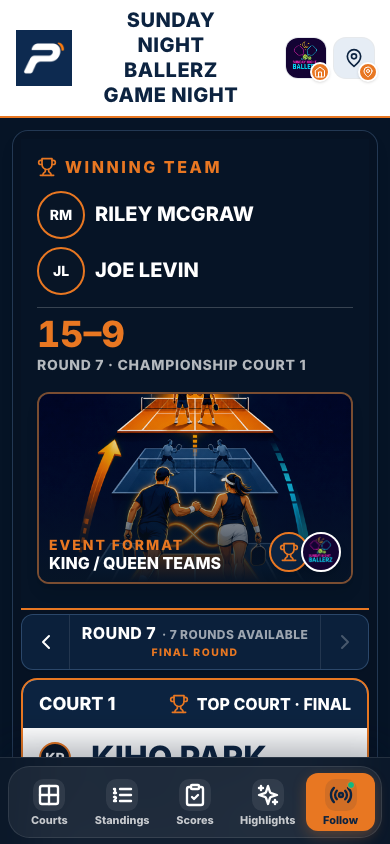
The public phone view of a completed August 16, 2026 Game Night, captured October 13. This is a results example, not a session currently in progress. Use the organizer’s event QR or public link to open your own night.
Web screen captured October 13, 2026. The iOS layout may differ. Tap the image to enlarge.
Arrive and find your first match
The organizer prepares the lineup from accepted players.
- Open the Game Night and follow its check-in instructions. Let the organizer know if you are present but missing from the lineup.
- Once the schedule is ready, find your name, partner or team, court, and round.
- Check the live event again before moving courts. Assignments can change between rounds.
- Use the event chat for event coordination when available. A chat message does not replace your RSVP.
Report your score to the organizer
Club Game Night score entry is manager-only. Watching through the public QR link does not grant scoring access.
- Check your court, round, and both teams on the scoreboard before reporting a result.
- Give both scores to an authorized event manager and wait for the saved result to appear.
- If the saved result is wrong, ask the organizer to review and correct it. Do not log a duplicate standalone match.
Follow rounds and final results
Use the courts and standings views to follow the event. Different formats rotate partners, keep teams together, or move players by results. A rest round is not necessarily a missing assignment. At the end, review the completed scoreboard; the organizer can review corrections after the event ends.
Why can’t I join or enter a score?
For joining, check membership, capacity, waitlist status, DUPR requirements, and whether registration is open. Club Game Night scores are entered by authorized managers. Ask the organizer about attendance, court assignments, or a result that needs correcting. Contact app support for a connection error that persists.